
You open your own website on your phone while standing in the shop. The screen stays white. A logo appears, then half a picture, then the page jumps as a slider loads. By the time it settles, a customer would already have gone back to Google and tapped the next result.
On office Wi-Fi the same site felt fine, which is why nobody noticed. Your customers, though, mostly visit on mobile data — in a market, on a rickshaw, at home during load-shedding when the router is off.
Why is my website slow on mobile?
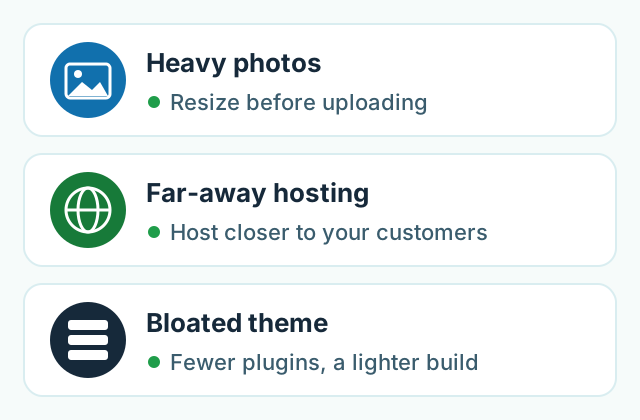
Most websites that are slow on mobile data have one of three problems: photos that are far too large, hosting on a server that is a long way from your customers, or a heavy purchased theme loaded with sliders, plugins and scripts. All three can be found with free tools in about fifteen minutes, and the first two are usually cheap to fix. Start with the photos; they are the most common cause and the easiest win.
Are big photos slowing down my site?
Very often, yes. A photo taken on a modern phone or a photographer's camera is several megabytes — sharp enough to print on a poster. A website shows it in a box a few hundred pixels wide on a phone screen. If nobody resized it, every visitor still downloads the full poster-sized file.
Multiply that by a homepage slider with five pictures, a gallery and a product grid, and the page becomes heavier than many short videos. On a weak 4G signal, that is the white screen you saw.
The fix is simple:
- Resize before uploading. Around 1,200 pixels wide is plenty for most website photos; small thumbnails need far less.
- Use a modern format such as WebP, which keeps the same look at a smaller size.
- Load pictures lower down the page only when the visitor scrolls to them (developers call this "lazy loading").
- Drop the homepage slider if you have one. One strong photo loads faster and, honestly, most visitors never wait for slide three.
Does it matter where my website is hosted?
It does. Hosting is the computer where your website lives, and every time someone opens a page, their phone has to talk to that computer. If your customers are in Lahore and the server is on the other side of the world, every request makes a long round trip — and a page needs many requests.
Cheap hosting adds a second problem: one overcrowded server shared by hundreds of other sites, so yours waits its turn. Our post on what domain and hosting cost every year explains the basics if those words are new to you.
Ask your developer or hosting company two questions: where is the server physically located, and is a content delivery network (a CDN) switched on? A CDN keeps copies of your images and files in many cities, so visitors download them from somewhere nearby. For a business whose customers are mostly in Pakistan, hosting in or near the region, or using a CDN, usually makes a noticeable difference.
Is my theme the problem?
If your site was built on a purchased template, there is a good chance. Popular themes are designed to please every possible buyer, so they ship with sliders, animations, several font families and dozens of features you never switched on — but your visitors still download much of that code.
Then plugins pile up over the years: a chat bubble, a pop-up, two analytics tools, a social feed, a page builder. Each one is small. Together they keep the phone busy before it can show your page.
Say you run a bridal boutique near Liberty Market in Lahore. Your site uses a premium theme with a full-screen video header, a slider of ten photographer's images straight from the camera, a chat widget, an Instagram feed and a pop-up offer. Removing the video and slider, resizing the photos and deleting three unused plugins could make it feel like a different website — with no new design at all.
This is also why we don't buy themes. Every site we build is custom and mobile-first, so it only carries the code it actually uses. You can see the kind of work we do in our services.
How can I test my website's speed myself?
You don't need a developer to find out whether there is a problem. Do these four checks:
- Use your own phone on mobile data. Turn Wi-Fi off, open a private (incognito) tab so nothing is cached, and load your homepage and your most important page. Count how long until you can read the main text and tap the WhatsApp button.
- Run our free website check. Enter your address and you get a plain-language score for speed, mobile-friendliness, SEO and security, with the main problems listed.
- Try Google's PageSpeed Insights and read the mobile tab. According to Google's own guide to PageSpeed Insights, the "field" data comes from real Chrome users, while the lab test simulates a mid-range phone on a mobile network. Google counts the main content appearing within 2.5 seconds as good, and a lab score of 90 or above as good.
- Slow your laptop down to phone speed. In Chrome, the Network panel's throttling menu lets you load your site as if on a 3G or slow 4G connection, and shows which files are the biggest.
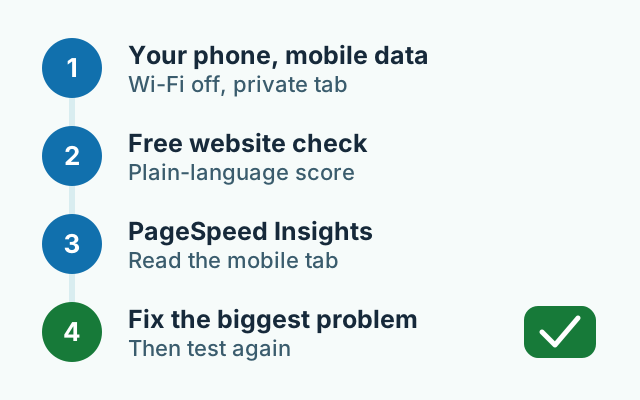
Don't chase a perfect score. Look at what the tools list as the biggest problems — usually "properly size images" or "reduce unused JavaScript" — and fix those first. A site that loads quickly for a real customer on a real phone matters more than a number.
When is a rebuild worth it?
Most slow sites can be repaired: resize the photos, remove what you don't use, switch on a CDN or move to better hosting. That is often a day or two of work, and we would say so honestly.
A rebuild makes sense when the theme itself is the weight — when the slider, page builder and scripts can't be removed without breaking the design — or when the site is several years old and no longer fits how your customers buy. In that case, fixing it piece by piece can cost more than starting clean.
Your quick checklist
- Open your site on your phone with Wi-Fi off. Does the main text appear quickly?
- Check your photo sizes; resize anything straight from a camera.
- Remove the homepage slider and any plugin you don't use.
- Ask where your server is and whether a CDN is on.
- Run a free check and fix the top one or two problems first.
If you'd like a second opinion, run your site through our free website check and send us the report — we'll tell you in plain words what's slowing it down.
Frequently asked questions
Will faster mobile data or 5G fix a slow website on its own?
Only partly. A faster connection downloads a heavy page more quickly, but the page is still heavy, and many of your customers are on a weak signal indoors or on the move. Making the page lighter helps every visitor, whatever network they are on.
Will a faster website rank higher on Google?
Speed is one of many things Google looks at, so nobody can promise a ranking because a site got faster. What a faster site reliably does is keep more visitors on the page long enough to call, message or order.
Do I have to rebuild my website to make it fast?
Not always. Resizing photos and removing plugins you don't use often fixes most of the problem in a day or two. A rebuild only makes sense when the theme itself is the heavy part and cannot be trimmed.
Will my photos look worse if I make them smaller?
Not on a phone. A photo resized to the width it is actually shown at looks the same on screen; you are only removing detail nobody can see. Keep the original file safely on your computer in case you need it later.