
Most of your customers already talk to you on WhatsApp. They find your website, like what they see, and then have to copy your number, save it as a contact, open WhatsApp and type "AoA, price?" Some do. Many give up halfway.
Your website and your WhatsApp Business account should work as one path, not two separate islands. Here is how to connect them, what each part is good for, and where automation helps or gets in the way.
What does WhatsApp Business website integration actually mean?
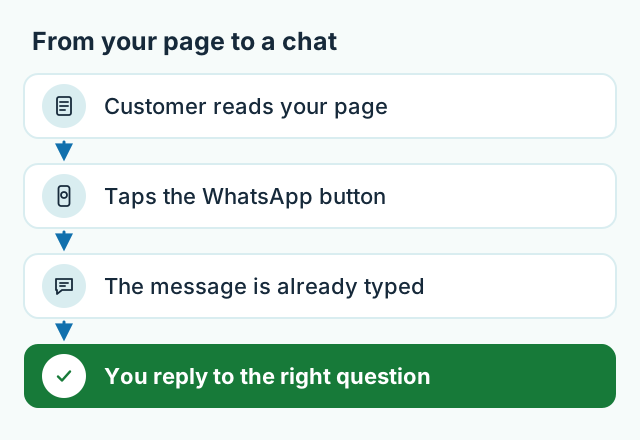
For most small businesses, WhatsApp Business website integration means one thing: a click-to-chat button on every important page that opens a chat with you, with a short message already typed in. The visitor taps once, presses send, and you know which page or product they were looking at. Add a catalogue for regular customers and simple greeting and away messages, and most businesses are covered. A full chatbot comes later, if at all.
There is no app to install and no platform fee for a basic button. It works on any phone that has WhatsApp.
How does a click-to-chat button work?
A click-to-chat button is just a link. It points to WhatsApp with your number in international format — for a Pakistani mobile, 92 followed by the number without the first zero. When someone taps it on a phone, WhatsApp opens straight into a chat with you. On a laptop, it opens WhatsApp Web or the desktop app.
Nobody has to save anyone's number first. That removes the step where most people drop off.
A few details decide whether the button actually gets used:
- Put it where the decision happens — next to prices, on each product or service, and on the contact page. Not only in the footer.
- On phones, add a small floating button in a corner, as long as it doesn't cover the menu or the "Add to cart" button.
- Use a number that is really answered. A button that leads to a phone sitting in a drawer is worse than no button.
- Keep the call button too. Some customers, especially older ones, would rather ring.
What should a prefilled message say?
The same link can carry a message that is already typed into the chat box. The customer can change it or just press send. This is the most underused part of the whole setup.
"Hi" tells you nothing. A message written for each page does the sorting for you:
- On a product page: "Hi, I'm interested in the Oak corner sofa. Is it available?"
- On a services page: "Hi, I'd like to book a consultation. Which times are free this week?"
- On a contact or quote page: "Hi, I'd like a quote. My business is…"
Say you run a furniture showroom in Gulberg and twenty people message you on a Saturday. With prefilled messages, you see at a glance which piece each person was looking at. You reply with the right photos and price, instead of asking "which one, sir?" twenty times.
Keep the message short and in the language your customers already use with you — Roman Urdu is fine if that is how they write. Leave room for them to add their own words.
Should you use the WhatsApp catalogue or your website?
Use both. They do different jobs.
The WhatsApp Business catalogue lives inside WhatsApp. It suits people who already have your number: a regular customer asks "what's new?" and you send the catalogue, or a single item, right in the chat. It is free, quick to update from your phone, and familiar to everyone.
Your website is what new customers find. A catalogue inside WhatsApp isn't built to be found on Google; your own pages are. The website is also where you can explain properly — full product details, sizes, delivery areas, return policy, and who you are.
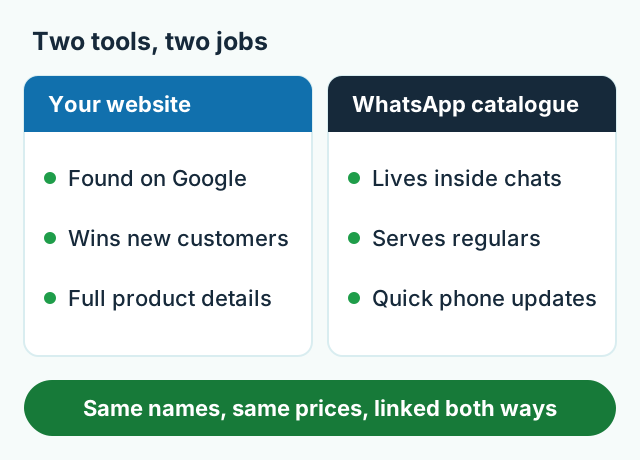
The one rule: keep them consistent. Same product names, same prices, same photos. A customer who sees one price on your website and another in the catalogue stops trusting both. Put your website link in your WhatsApp Business profile, and put WhatsApp buttons on your website, so each one leads to the other.
Say you sell unstitched lawn suits from a home setup in Faisalabad. Regular buyers get new arrivals through the catalogue on WhatsApp. People searching Google for a new supplier land on your website's collection pages, tap the button, and arrive in the same chat.
When does an auto-reply bot actually help?
Start with the free tools inside the WhatsApp Business app:
- Greeting message — sent automatically when someone messages you for the first time, or after a long gap.
- Away message — sent outside your working hours, so nobody feels ignored.
- Quick replies — saved answers for common questions (location, timings, bank details) that you insert with a shortcut.
For a business with one person on the phone, these three cover a lot. A menu bot or an AI chatbot starts to make sense when:
- You answer the same few questions all day — timings, location, delivery charges, "price?"
- Many messages arrive after hours and wait until morning.
- Several staff need to answer from one business number.
- You want every enquiry to land in a sheet or system automatically.
A bot is a bad idea when every conversation is different, when you get only a handful of chats a day, or when customers buy from you because they talk to you. A bot that traps someone in "press 1 for…" loops loses the sale. Always give an easy way to reach a person.
Say you run a pharmacy delivery service in Islamabad. At night, people keep asking about timings and delivery areas. A simple menu bot can answer those, collect the order details, and leave anything involving a prescription for a person to handle in the morning.
One practical note: bots that share a business number usually run on the WhatsApp Business Platform (the API), not the phone app. Meta sets its own rules and approvals there and charges for some messages — check Meta's current WhatsApp pricing page before you plan a budget around it. Those decisions are Meta's, not ours or any developer's.

What does it cost to set this up?
WhatsApp and click-to-call buttons are standard on every business website we build, and our business website package starts from PKR 50,000 — see our fixed-price packages for what else is included. WhatsApp Business auto-replies and menu bots are something we set up too. An AI chatbot is a custom add-on, so we quote it after a short call once we know what it needs to answer.
Quick checklist: website and WhatsApp working together
- A WhatsApp button next to every price and product, plus a floating button on phones.
- A prefilled message for each key page, so you know what each chat is about.
- The same product names and prices on the website and in the catalogue.
- Your website link in your WhatsApp Business profile.
- Greeting message, away message and quick replies switched on.
- A bot only when repeated questions pile up — with an easy way to reach a person.
If you'd like help putting this together, have a look at what we build, or send us a short message — a real person on our Lahore team will reply.
Frequently asked questions
Is a WhatsApp click-to-chat button free?
Yes. WhatsApp does not charge for click-to-chat links, and they work with both the regular WhatsApp app and the WhatsApp Business app. You only pay for whoever builds or edits your website.
Can I put my personal WhatsApp number on my website?
You can, but a separate number on the WhatsApp Business app is better. It gives you a business profile, a catalogue, greeting and away messages, and keeps customers out of your family chats.
Will a WhatsApp button slow down my website?
A plain link button adds almost nothing to the page. Heavy third-party chat widgets can slow a site down on mobile data, so a simple button is usually the better choice.
Do I need the WhatsApp Business API for my website?
Not for a click-to-chat button, a catalogue or basic auto-replies — the free WhatsApp Business app handles those. The API matters when several staff share one number or a bot replies automatically, and Meta charges for some of those messages.