
A customer finds your website, picks a product, and then asks on WhatsApp: "Can I pay by JazzCash?" You send your number, wait for a screenshot, open your own app to check, and confirm the order by hand. That works while orders are few. It falls apart when they are many.
So you want customers to pay on the website itself. Before you pay anyone to "add JazzCash", it helps to know who does what, because the most important step is not in your developer's hands.
How do you accept JazzCash and Easypaisa payments on your website?
To accept JazzCash and Easypaisa payments on your website, you apply for a merchant account with each provider, and the provider, not your developer, decides whether to approve your business after checking your documents. Once you are approved, they give you credentials, your developer connects their payment gateway to your checkout, tests it, and then switches it live. Start the application early, because the timing of the approval is also the provider's decision.
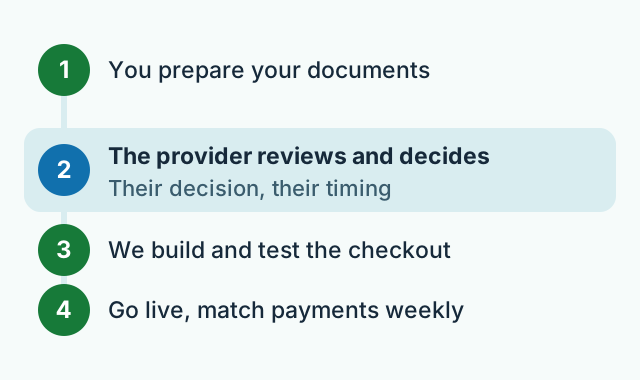
The whole journey has four steps:
- You prepare your documents and a website that is ready to sell.
- The provider reviews and decides whether to approve your merchant account.
- We build and test the checkout with the credentials they give you.
- You go live and match payments against orders every week.
Who decides whether you get a merchant account?
The payment provider does. JazzCash and Easypaisa each run their own merchant onboarding, look at your business and your documents, and decide whether to approve you and on what terms. A developer can prepare a clean application and answer the technical questions, but nobody outside the provider can promise approval or a date. Be careful with anyone who does.
You apply to each provider separately. Their official merchant pages are the place to start and to check the current requirements: the JazzCash Online Payment Gateway page and the Easypaisa Online Payment Gateway page. Fees, settlement timing and the exact document list are set by them and can change, so ask for them in writing when you apply.
What documents should you prepare before applying?
The exact list comes from the provider and depends on whether you are a sole proprietor, a partnership or a company. Having these ready usually saves a lot of back-and-forth:
- Identity documents for the owner, partners or directors, such as CNIC copies.
- Proof that the business exists, for example your NTN, SECP incorporation certificate or partnership deed, whichever applies to you.
- A bank account in the business's name, so the money settles into an account that matches your application.
- Business contact details: an address, a phone number and an email that someone actually answers.
- A working website that clearly shows what you sell and at what price.
The website matters more than most people expect. Before you apply, make sure it has a clear refund and return policy, delivery terms, terms and conditions, and real contact details. These pages help customers trust you, and they are exactly the kind of thing a payment provider is likely to look at.
Say you run a home bakery in Wapda Town, Lahore, and take cake orders on Instagram. If the bakery has no registration and no business bank account yet, sort those out first. Applying with half the paperwork only means waiting longer for an answer.

What does the integration actually involve?
Once the provider approves you, they share your merchant credentials and their integration guide. From there it is technical work, and that part is ours:
- Choosing the checkout style. Usually the customer is sent to the provider's secure payment page and then brought back to your site, or pays from their mobile account without leaving your checkout. JazzCash's sandbox documentation lists card, mobile wallet and voucher payments, and the merchant chooses which to offer.
- Testing before real money moves. The same JazzCash documentation includes transaction testing before going live. We place test orders, failed payments and cancellations there, or in whatever test setup the provider gives, so every case is checked.
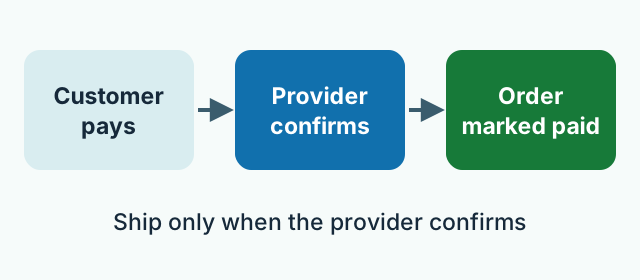
- Confirming payments properly. An order should be marked paid only when your website receives confirmation from the provider itself. Not because the customer reached a "thank you" page, and never because of a screenshot.
- Handling the unhappy cases. Failed payments, abandoned checkouts, refunds and late confirmations all need a clear status in your admin panel.
- Keeping it secure. Your secret keys stay on the server, where customers cannot see them, and every request is checked the way the provider's guide requires.
If your store runs on a common platform, a ready-made plugin may cover part of this. A custom website needs the connection built directly. Either way, it has to be tested from start to finish before launch.
Should you offer both JazzCash and Easypaisa?
Often, yes. Customers tend to stick with the wallet they already use, and someone who has only one may not bother to open another. Each provider is a separate merchant account and a separate integration, so it is perfectly fine to start with one and add the other once the first is running smoothly. Card payments can be added the same way through a card gateway.
Keep cash on delivery alongside online payment. Our guide to starting an online store with cash on delivery explains why new customers still prefer it and how to cut fake orders.
Say you sell school uniforms from a shop in Rawalpindi, and parents order online before the new term. Many will happily pay by wallet if it takes one tap. Others will want to pay when the parcel arrives. Offer both and let each parent choose.
What does it cost to add a payment gateway?
There are two separate costs. The provider charges its own transaction fees, which it sets and you agree to when you sign up, so ask the provider for its current rates. The integration is our work: we scope it together with your website and give you a fixed written quote after a short call, because adding a simple checkout to an existing site is very different from building a full online store. You can see what we build under our services.
A short checklist before you apply
- Business registration and a bank account in the business name ready.
- A website with prices, a refund policy, delivery terms and contact details.
- An application made on the provider's official merchant page.
- The provider's fees and settlement timing in writing.
- A checkout tested from start to finish, including failed payments and refunds.
If you would like us to prepare the application with you and handle the integration, send us a short message and a real person on our Lahore team will reply.
Frequently asked questions
Can 77-Technologies get my merchant account approved?
No one outside the provider can promise that. JazzCash and Easypaisa decide on each merchant themselves. We help you prepare a complete application and then build and test the integration once you are approved.
Do I need a registered business to accept wallet payments on my website?
Each provider sets its own requirements, and they can differ for a sole proprietor, a partnership or a company. Check the provider's official merchant page, or ask us and we will go through it with you before you apply.
Is a separate merchant account needed for JazzCash and for Easypaisa?
Yes. Each provider approves you separately and gives you its own credentials, so each one is a separate application and a separate connection to your checkout.
Should I remove cash on delivery once online payment works?
No. Keep both. New customers often still prefer to pay when the parcel arrives, while regular customers enjoy paying in advance. Let the customer choose.