
It is ten in the morning and the clinic phone has not stopped ringing. One caller wants to know if the doctor is sitting today. Another wants an evening slot. A third is asking the same question for the third time. Meanwhile, patients standing at reception are waiting to be seen.
Many clinics try to fix this with "online booking" and put a long form on their website. Patients fill in half of it, give up, and call anyway. The real question isn't whether to have online booking. It's whether the booking is easy enough that patients actually finish it.
What does good online appointment booking for clinics look like?
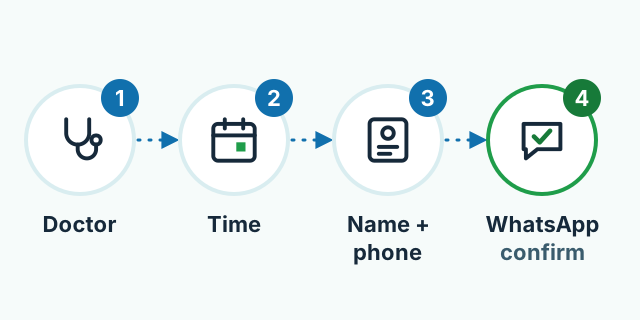
Good online appointment booking for clinics lets a patient do four things on their phone in about a minute: pick a doctor, pick a free slot, type their name and phone number, and get an instant confirmation on WhatsApp. No account, no password, no app to download. The fewer questions you ask, the more bookings get completed.
Why do patients abandon booking forms halfway?
Most of the reasons are simple, and all of them can be fixed:
- The form is too long. Age, address, email, CNIC number, medical history: none of it is needed to book a slot. Collect it when the patient arrives.
- You make them create an account. Someone with a fever is not in the mood to invent a password.
- They can't see free times. If the form ends with "we will contact you", the patient thinks they might as well have called.
- The page is poor on a phone. Most patients book from mobile. Tiny buttons and a slow page send them back to dialling.
- Silence after booking. No message, no confirmation. The patient isn't sure the slot is really theirs.
How should the four booking steps work?
1. Choose a doctor or department
If your clinic has one doctor, skip this step. If there are several, show each doctor's photo, speciality and sitting days clearly, so nobody has to guess.
2. Choose a free time slot
Show only the slots that are genuinely free. Keep morning and evening slots visibly separate. When a doctor is on leave, those days should close automatically. Otherwise you'll have to cancel bookings later, and that breaks the patient's trust.
3. Name and phone number
Just those two. If you need it, add one short optional box: "Briefly describe the problem." Make sure the phone field opens the number keypad on mobile.
4. Instant confirmation on WhatsApp
As soon as the booking is made, the patient should get a short WhatsApp message with the doctor's name, the day and time, the clinic address and a map link. Send a reminder the day before, with a way to change or cancel. Patients in Pakistan rarely check email, but they read WhatsApp messages straight away.
Automated WhatsApp Business messages are governed by Meta's own rules and approval process, which change from time to time. Check the current terms before you set this up. Meta decides what gets approved, not your developer.
What does this look like for a real-world clinic?
This is a hypothetical example. Say you run a dental clinic in Johar Town, Lahore, with two dentists. Your receptionist spends half the day on the phone quoting timings and writing names in a register, and several patients book and never show up.
Now you add a simple booking page to your website. A patient picks a dentist, sees the free evening slots, enters a name and number, and gets a WhatsApp confirmation on the spot. Reception sees the whole day's bookings in one list on a screen. A reminder goes out the day before, and a patient who can't come replies to say so, so that slot goes to someone else.
Phone calls won't stop, and they shouldn't. Older patients will still ring. But your receptionist gets time back for the people standing in front of them.
Do you need a website, an app, or a big booking platform?
Most clinics don't need an app to start. Nobody downloads an app to see one doctor. A booking page on your website, linked from your Google Business Profile, your Facebook page and your WhatsApp bio, is enough. Think about an app when you have several branches and patients keep coming back for reports, prescriptions or follow-ups.
Being listed on the large doctor-booking platforms can help too, because that's where new patients search. Booking on your own website adds something different: returning patients come straight to you, and the patient records stay with your clinic.
Why does the system behind the form matter?
The booking form looks simple from the front, but the real work happens behind it. Two patients must never get the same slot. A doctor's leave must show up immediately. Messages must go out on time. Patient details must stay private and secure. Patients never see these parts, but when they fail, they're the first thing people complain about.
We've worked on this kind of system at a much larger scale. For Marham, Pakistan's largest find-a-doctor platform, we did backend rebuilds, operations engineering, security hardening and SEO. We didn't build Marham's front-end; our work was behind it. You can read more in our work section. A small clinic doesn't need a system that size, but the same principles apply: no double bookings, safe data, and a system that keeps working at the busiest hour.
Checklist: is your clinic's booking system ready?
- Can a patient finish booking on a phone in about a minute?
- Do you ask only for a name and phone number, with no account?
- Are only genuinely free slots shown?
- Does a WhatsApp confirmation go out right away, plus a reminder the day before?
- Can reception see all of the day's bookings in one place?
- Is the booking link on your Google Business Profile and social pages?
If you'd like a booking system like this on your clinic's website, have a look at our services or get in touch. After a short call, we'll send you a written quote.
Frequently asked questions
Does a small clinic with one doctor really need online booking?
If your phone rings all day with people asking about timings and free slots, yes. A simple booking page takes load off reception and lets patients book at night, after you have closed.
Should patients have to create an account to book?
No. For most clinics a name and phone number are enough. Asking for an account and password makes many patients give up halfway.
Can we take the consultation fee online at the time of booking?
Yes, through JazzCash, Easypaisa or a bank transfer. But for most clinics starting out, paying at the clinic keeps booking short and is the better first step.
What about patients who book and then don't turn up?
Send a WhatsApp reminder the day before with an easy way to change or cancel. That way a freed-up slot can go to another patient instead of sitting empty.