
A customer in Lahore types a long question into Google: "which bakery near Model Town does sugar-free birthday cakes and delivers tonight?" Instead of ten blue links, they get a written answer with a few businesses named and linked. The same thing happens when someone asks ChatGPT.
If your business isn't in that answer, the customer may never scroll far enough to find you. So the question owners now ask us is simple: how do I get into the AI answer?
How do you get your business into Google AI Mode and ChatGPT answers?
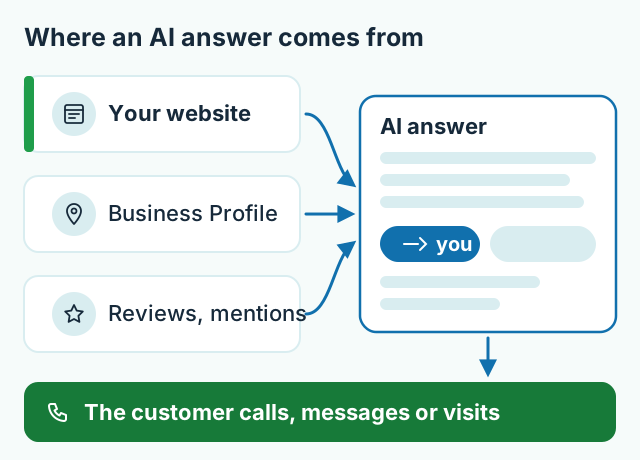
You get into AI answers the same way you get into Google: a website that search engines can read, pages that answer real customer questions clearly, and business details that match everywhere. Google says there are no additional requirements or special optimisations for AI Overviews or AI Mode — a page only needs to be indexed and eligible to show with a snippet. ChatGPT search finds sites through OpenAI's own crawler, so your site must not block it.
There is no secret "AI SEO" switch. Anyone selling one is selling hope.
What changed in AI search this year?
Three things matter for a business owner.
AI Mode is available in Pakistan, including in Urdu. Google launched AI Mode in Pakistan in August 2025, in English at first (Dawn). Google's AI Mode help page now lists Urdu among the supported languages. Your customers can ask long, detailed questions in the language they think in.
You can now see when Google's AI shows your pages. On 3 June 2026 Google announced new Search Console reports for its generative AI features, and updated the same post on 31 August 2026 to say they had rolled out to all websites worldwide. The reports show impressions from AI Overviews, AI Mode and Discover by page, country and date. Search Engine Journal noted on 31 August 2026 that click data was not included yet.
There is now an opt-out — with a cost. The same Google announcement added a Search Console setting to keep your site out of generative AI features, and says plainly: "Sites that opt out will not receive traffic or impressions from our generative AI features." For almost every small business, staying in is the right call.
What do Google and OpenAI say they look for?
Google's advice is to publish "unique, non-commodity content" — information that isn't copied from everyone else — along with a good page experience and quality images, according to its announcement for website owners. Its guidance on AI features adds the basics: let Google crawl the site, keep important content in text, use internal links, keep structured data accurate and keep your Business Profile up to date.
OpenAI's crawler documentation says OAI-SearchBot is what surfaces websites in ChatGPT search. It is a separate setting from GPTBot, which collects content for training — so you can appear in ChatGPT search while declining training. OpenAI says changes to your robots.txt file take about a day to be picked up.
Five things to fix on your website
1. Make sure search engines can read it
Ask your developer to check three things: the site is indexed in Google (Search Console will tell you), the robots.txt file doesn't block Googlebot or OAI-SearchBot by accident, and the important text is real text — not words baked into images. Our free website check is a quick first look.
2. Answer the questions customers actually ask
AI answers quote pages that answer clearly. Put the answer first, then the detail. A clinic page should say which doctors are available on which days, where you are, and how to book. A shop page should say what you sell, which areas you deliver to, and how to order. Vague lines like "we offer quality services" give an AI nothing to quote.
3. Keep your details identical everywhere
Your business name, address, phone number and hours should match on your website, your Google Business Profile, Facebook and every directory. When the details disagree, both customers and search engines trust you less.
4. Show real experience, not filler
Google's spam policies call out "scaled content abuse" — pages churned out to manipulate rankings rather than help people, including with AI. Twenty AI-written pages about "best bakery in Lahore" won't help you. One honest page with your own photos, your real menu and the questions you hear at the counter will.
Say you run a tile showroom in Faisalabad. A page that explains which tiles suit bathrooms versus kitchens, shows photos of your stock, and lists delivery areas gives an AI assistant something specific to recommend. A page that says "Pakistan's No. 1 tiles" doesn't.
5. Check your AI visibility once a month
Open Search Console, look at the generative AI report, and see which pages appear. If your services page never shows up but your contact page does, the services page probably isn't answering anything. Rewrite it, wait a few weeks, and look again.

What AI search can't promise
Nobody can guarantee your business will be mentioned in an AI answer — not us, not an agency, not a freelancer on Facebook. Google and OpenAI decide what their answers say, and they change their systems often. What you can control is whether your site is readable, useful and consistent. That also happens to be what wins in ordinary Google results.
Quick checklist
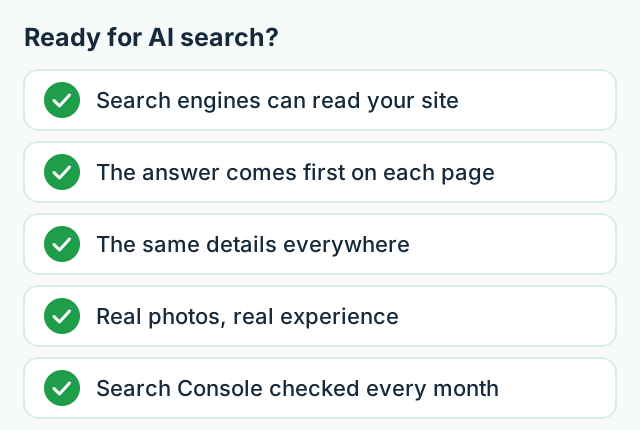
- Your site is indexed, and robots.txt doesn't block Googlebot or OAI-SearchBot.
- Each key page answers one customer question in its first few lines.
- Name, address, phone and hours match everywhere, including your Business Profile.
- Real photos, real prices from your own price list, real experience.
- You look at the Search Console AI report once a month.
Every business website we build comes with basic SEO setup, and ongoing SEO is a separate monthly service from PKR 25,000/month — see our fixed-price packages, or tell us about your business and we'll say honestly what your site needs first.
Frequently asked questions
Do I need a special AI SEO service to appear in AI answers?
No. Google says there are no extra requirements or special optimisations for its AI features. The same things that make a page useful and easy for Google to read are what make it eligible to be cited.
Can anyone guarantee that ChatGPT or Google will mention my business?
No. Google and OpenAI decide what their AI answers include, and nobody outside those companies controls it. Be wary of anyone who promises a guaranteed mention.
Should I block AI bots from my website?
Only if you have a clear reason. Blocking OpenAI's search crawler or opting out of Google's AI features also removes you from those answers. You can allow search crawlers and still block AI training crawlers, because they are separate settings.
Does my Google Business Profile matter for AI search?
Yes. Google's own guidance for AI features includes keeping your Business Profile information up to date, and local answers lean on your name, address, hours and reviews.